
In the evolving ecosystem of Tom Clancy’s Rainbow Six Siege, the R6 Marketplace has transformed in-game cosmetics from mere aesthetics into a dynamic digital economy. While most guides offer a surface-level glance at the interface, this professional analysis deep-dives into the mechanics, strategies, and data-driven insights required to master the market.
Whether you are looking to liquidate your Year 1 skins or acquire the elusive Glacier set, this guide provides the tactical edge that standard competitor content lacks.
1. Understanding the R6 Marketplace Ecosystem
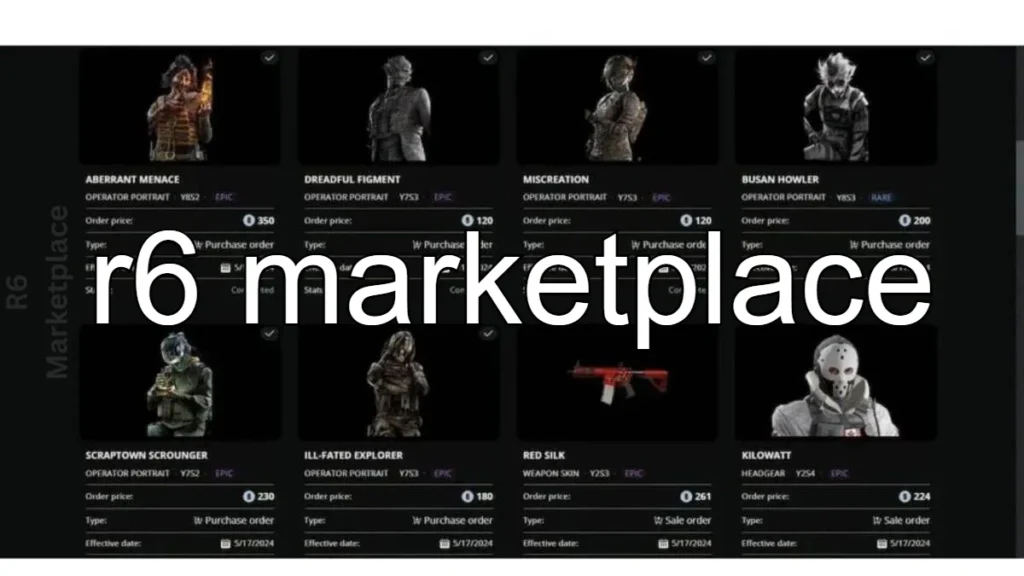
The R6 Marketplace is a secure, web-based platform allowing players to trade in-game items for R6 Credits. Unlike “gray market” third-party sites, this is an official Ubisoft environment, ensuring transaction security and account integrity.

The Key Distinction: The marketplace operates on an Order-Matching System. You aren’t buying directly from a “shop”; you are filling a sell order placed by another player.
2. Step-by-Step: The Professional Buy/Sell Process
To trade effectively, you must understand the lifecycle of a transaction.
How to Buy
- Search & Filter: Use the “Browse” tab to filter by Season, Rarity, or Weapon.
- Analyze the Range: Look at the “Current Price Range” and “Last Sold” data.
- Place a Buy Order: Enter your maximum price. Your credits are held in escrow.
- The 30-Day Rule: Buy orders stay active for 30 days. If a seller matches your price within this window, the item is yours.
How to Sell
- Inventory Assessment: Select “Sell” to see eligible items.
- Pricing (The 10% Rule): Ubisoft takes a 10% transaction fee.
- Pro Tip: If you want to net 900 Credits, you must list the item for 1,000 Credits.
- Market Placement: Once listed, your item enters the queue. If a buyer’s price matches yours, the sale executes automatically.
3. Eligibility & Security Requirements
Before you can trade, your account must meet specific “Trust Tiers”:
- Two-Factor Authentication (2FA): Mandatory for account security.
- Clearance Level: Typically requires Level 25+ (subject to Ubisoft’s seasonal updates).
- Sanction Status: Accounts with active bans or severe toxicity reports may be restricted from trading.
4. Official Marketplace vs. Third-Party Sites
Many players fall into the trap of using unauthorized sites. Here is why the official platform wins:
| Feature | Official R6 Marketplace | Third-Party Sites |
|---|---|---|
| Currency | Official R6 Credits | Real Cash / Crypto (Risky) |
| Safety | 100% Guaranteed by Ubisoft | High Risk of Scams/Phishing |
| Account Status | Safe | High Risk of Permanent Ban |
| Fees | 10% Flat Fee | Variable / Hidden Fees |
| Delivery | Instant upon match | Manual / Transfer Risks |
5. Pricing Mechanics & Dynamic Limits
Marketplace Profit Calculator
The R6 Marketplace uses a Price Ceiling and Floor system to prevent extreme market manipulation.
- Price Floors: Common items cannot be sold below a certain threshold (e.g., 120 Credits).
- Price Ceilings: Prevents “Credit Transferring” between accounts by capping the maximum price of lower-tier items.
- The Queue Logic: The marketplace follows a “First In, First Out” (FIFO) priority. If ten people list an item for 500 credits, the person who listed it first gets the sale.

6. Advanced Trading Strategies
As a professional trader, I utilize these three core strategies to maximize credit value:
A. The “Buy Low, Sell High” Seasonal Flip
Prices often dip at the start of a new Siege season when players sell their old skins to afford the new Battle Pass or Elite sets.
- The Play: Acquire high-demand skins (like Black Ice for popular operators) during the first 48 hours of a new season. Hold for 3-4 weeks as the market stabilizes, then sell for a 20-30% profit.
B. Weekend vs. Weekday Patterns
Market volume peaks on Friday nights and Saturdays.
- The Play: List your items for sale on weekends when buyer traffic is highest. Conversely, look for “sniping” opportunities (low-priced buy orders) during mid-week lulls.
C. The Rarity Speculation
Items from early Year 1 or Year 2 (e.g., Dust Line, Skull Rain) have finite supplies. As collectors join the game, the demand for these “Legacy” items increases while the supply remains stagnant.
7. Price Trend Analysis (Data-Driven Insights)
Understanding the “Volatility Curve” is essential.
| Item Category | Price Stability | ROI Potential | Recommended Action |
|---|---|---|---|
| Black Ice (Primary) | High | Moderate | Long-term Hold |
| Seasonal Uniforms | Low | Low | Sell Immediately |
| Glacier / Grade Skins | Extremely High | High | Elite Investment |
| Event Skins (e.g., R6 Invitational) | Moderate | High | Buy during off-season |
8. Risk Mitigation: Protecting Your Assets
- Avoid “Credit Sellers”: Purchasing credits from unauthorized sellers via the marketplace is a “banable” offense. Ubisoft’s automated systems track irregular trade patterns.
- Check the “Last Sold”: Never place a buy order significantly higher than the “Last Sold” price unless you are certain of a value spike.
- The Cooldown Period: Remember that purchased items have a holding period before they can be re-sold. This prevents rapid-fire bot flipping.
9. Console vs. PC Dynamics
While the marketplace is unified via Ubisoft Connect, user experiences vary:
- PC Users: Benefit from easier navigation and faster refreshing via web browsers.
- Console Users: Ensure your Ubisoft Connect account is correctly linked to your PSN/Xbox Live ID. Any “Inventory Sync” issues should be resolved through Ubisoft Support before listing high-value items.
10. Community Insights: What the Forums Say
Recent discussions on Reddit and Discord highlight a common frustration: Order Refreshing.
- Expert Insight: Many users believe they need to cancel and replace orders to “stay on top.” This is a myth. Due to the FIFO system, canceling your order actually puts you at the back of the line. Patience is your greatest asset.
11. Frequently Asked Questions (FAQs)
Q: Can I trade items directly with a friend? A: No. To prevent real-money trading scams, all trades must go through the public matching system.
Q: Why isn’t my item appearing in the “Sell” tab? A: Not all items are currently supported in the Beta. Ubisoft adds new “waves” of eligible items periodically. Additionally, check if the item is currently equipped in a “Loadout Lock.”
Q: How long does it take to receive credits after a sale? A: Transactions are processed almost instantly. If there is a delay, it is usually a visual sync issue that is resolved by restarting your browser or game client.
Q: Is there a limit to how many active orders I can have? A: Yes. Currently, there is a limit on active Buy and Sell orders (typically 5 each) to prevent market spam.
Final Pro Tips for Success
- Monitor the “New Arrivals”: When Ubisoft adds a new batch of items to the marketplace, the initial price volatility is massive. This is the best time for “sniping.”
- Use a Profit Calculator: Always subtract 10% from your intended sale price to ensure you aren’t losing credits on a trade.
- Diversify your Inventory: Don’t put all your credits into one skin. Spread your investments across different operators and weapon types.
By approaching the R6 Marketplace with a trader’s mindset rather than a casual gamer’s perspective, you can build a massive credit reserve without ever spending additional real-world money. Stay disciplined, track the trends, and always verify your security settings.